
All your projects
from BOQ to ledger
BOQs, budget, procurement, subcontractors, certificates, site and finance — one system where every part knows the others, with an AI assistant that answers from your data.
Speaks the language of your work
Instead of scattered sheets
that never agree
A purchase order commits against its BOQ line, a certificate posts to the ledger, and what is left shows instantly. One figure everywhere.
From the first line
to the released retention
Each stage builds on the one before, so no figure is entered twice.
Before execution
The BOQ becomes an approved budget.
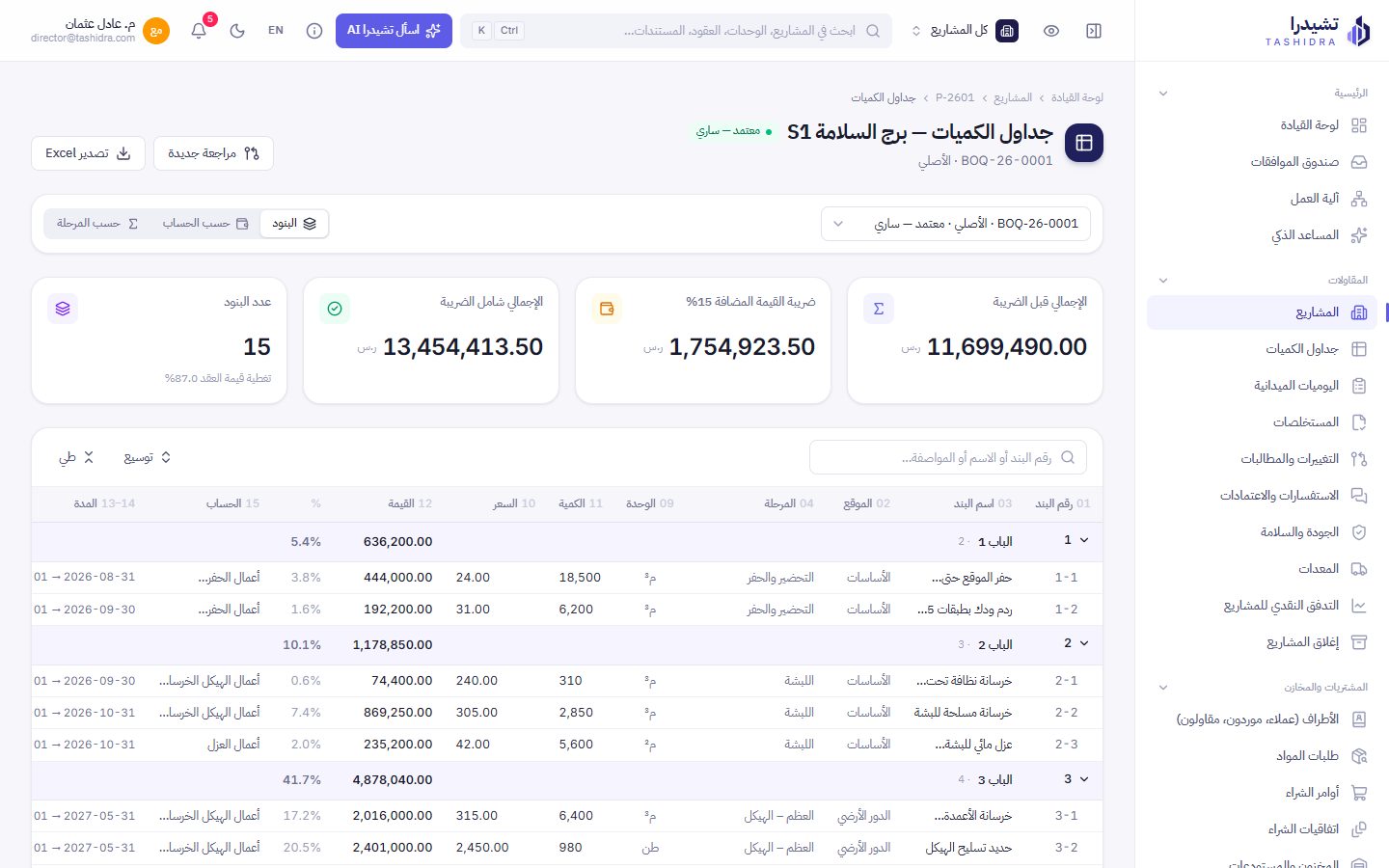
- 15 columns: location, phase, account and dates per line
- Versioned revisions; changes count only once approved
During execution
Site, purchasing and certificates on the same line.
- Site logs feed progress and the S-curve
- RFIs and submittals with due dates and reminders
After execution
An orderly closeout that leaves nothing hanging.
- A project cannot close before its closeout is approved
- Lessons learned kept for the next project
Every role sees
only what is theirs
Management & project managers
The project on one screen: budget, progress, what is late and what awaits your decision.
- One approvals inbox
- Switch project from the top bar
Technical office & site
BOQs, site logs, RFIs, quality, HSE and equipment.
- Excel-like entry
- NCRs back-charged to the subcontractor
Finance & procurement
Automatic entries on project cost centres; certificates with retention, advance recovery and VAT.
- A trial balance that always balances
- Cash flow per project
Precise in the details
clear in the big picture
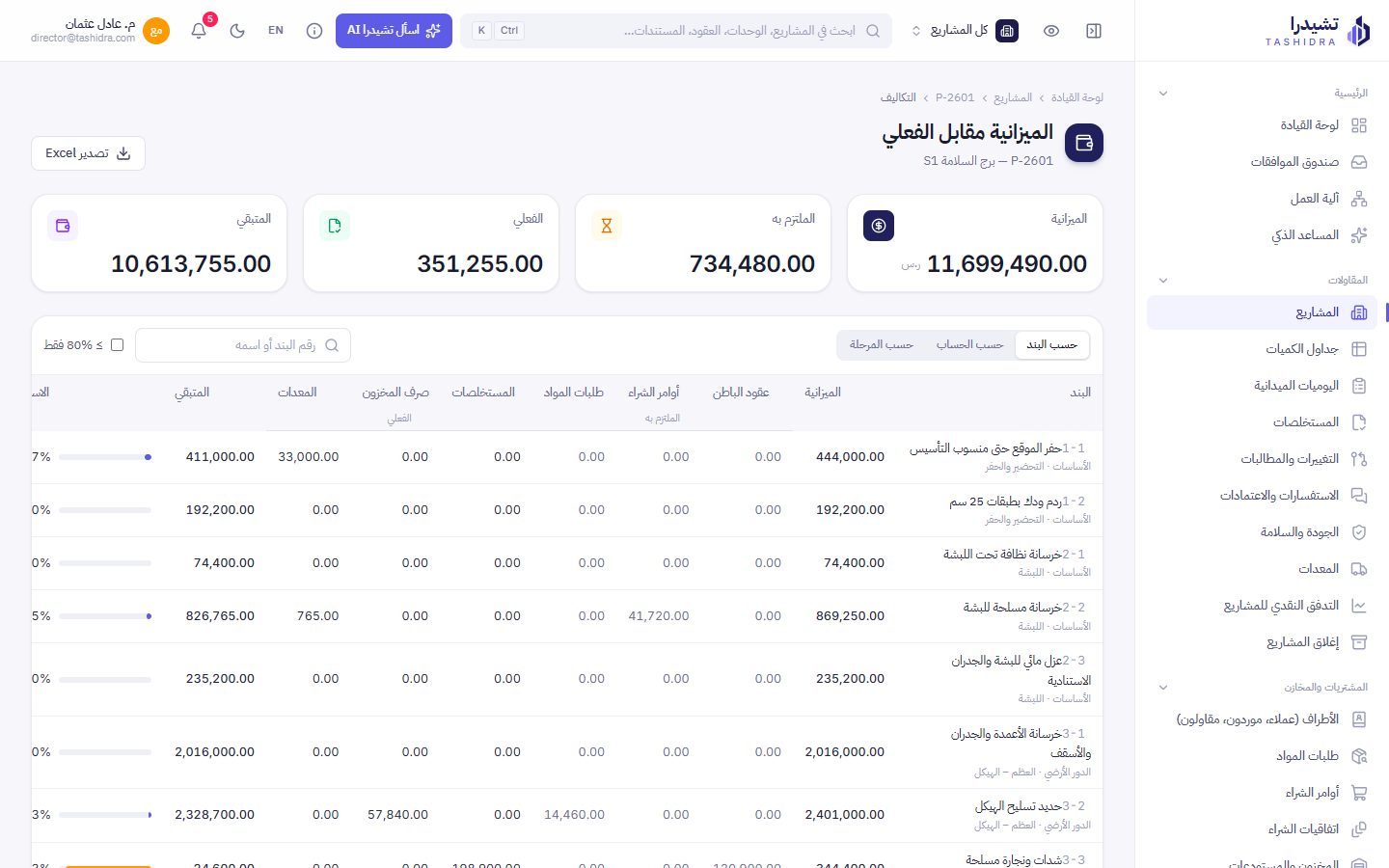
Budget vs actual, line by line
Committed from contracts and orders, actual from certificates, stock and equipment, and the remainder computed.
A BOQ that feels like Excel
Paste from Excel, move with arrows and Enter, or import the file and review before saving.
A certificate that computes itself
Approvals you configure
Steps by amount and role, with delegation and reminders.
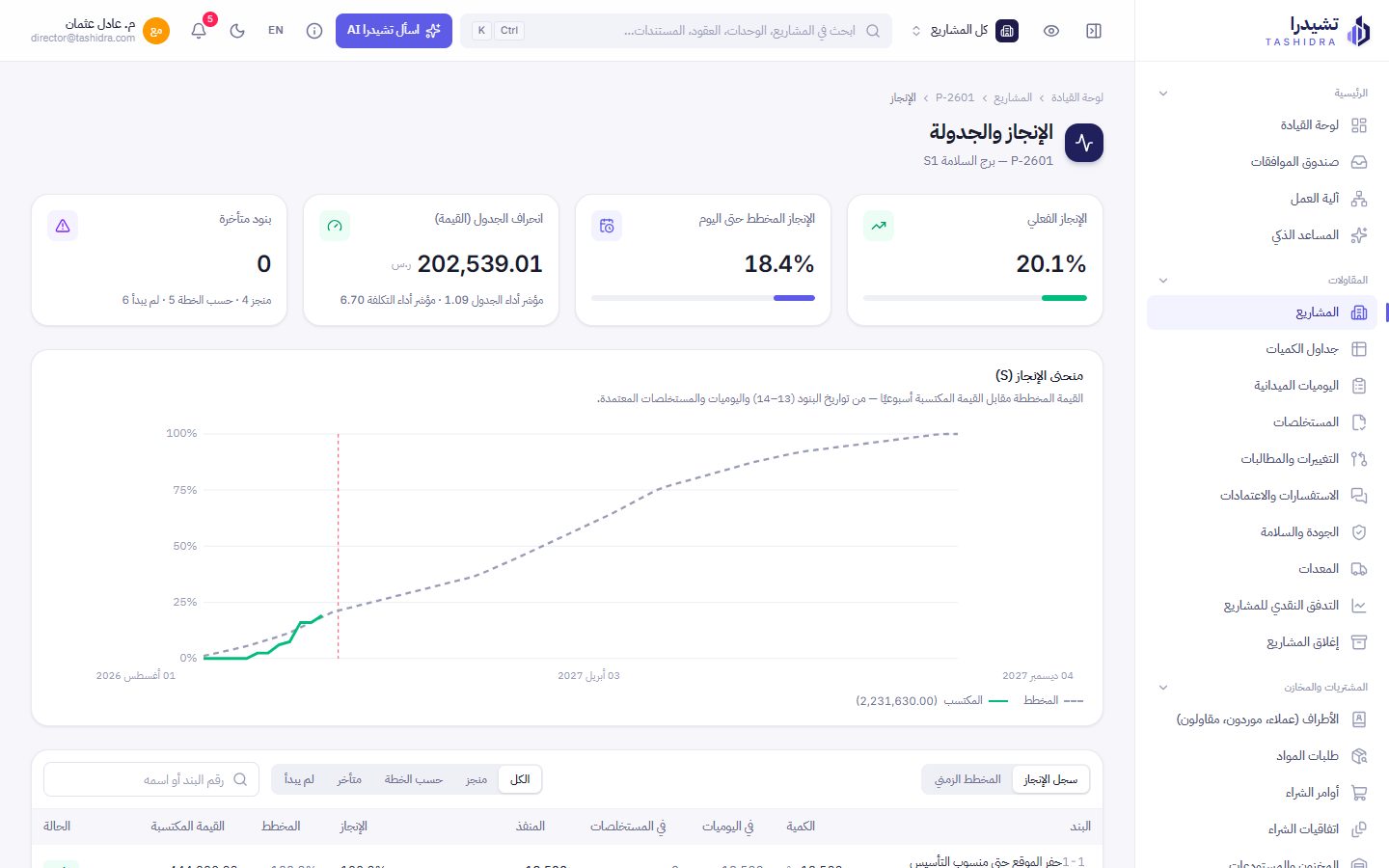
The S-curve
Planned vs earned weekly, from dates and site logs.
Progress and schedule
Schedule and cost performance, and late lines before they slip.
An audit trail that cannot be edited
Who changed what and when, for every record.
Purchasing tied to the line
Material request → PO → receipt → issue to site; each step commits against its BOQ line and budget.
Quality, HSE and equipment
Inspections, NCRs, punch items, HSE records, and equipment usage costed to the project.
Ask Tashidra
It knows how the system works and reads your live data with your permissions. Ask: how do I add… why does it show… why was this figure computed?
Because three deductions come off the work done before VAT is added:
Standard model · read live data
After the project closeout is approved: Closeout → Retention release, and its entry is posted automatically.
Your permissions, no more
It reads only what you may see, and never writes or changes data.
The right model for each question
The tier is picked automatically, so you pay for what the question needs.
Saved conversations
Return to any conversation and continue it from any device, or ask from the side panel without leaving your page.
An illustration with demo data. The assistant comes with the Advanced plan and works with Claude or OpenAI.
A clear subscription
sized to your company
Starter
For a contractor starting to run projects in one system
3 active projects · 10 users
Choose plan- Projects and BOQs (Excel)
- Budget vs actual
- Site logs and progress
- Approvals and audit trail
- Subcontracts and certificates
- AI assistant
Professional
For a contractor with project, procurement and finance teams
15 active projects · 40 users
Choose plan- Everything in Starter
- Procurement and inventory
- Subcontracts, certificates and retention
- Changes, quality & HSE, equipment
- Cash flow and project closeout
- General ledger and automatic entries
Advanced (AI)
Everything in Professional, with an assistant that knows your system and data
30 active projects · 80 users
Choose plan- Everything in Professional
- “Ask Tashidra”: answers from your live data
- Three model tiers picked automatically
- Saved conversations per user
- Respects permissions, never changes data
- Smart BOQ import (soon)
Enterprise
For groups and developers with several entities and branches
Projects and users as needed
Contact us- Everything in Advanced
- Several companies and branches in one workspace
- Dedicated server and your own domain
- Approvals and roles configured with you
- Data migration and training
- Priority support
Prices in Saudi riyals, excluding VAT. Monthly is the yearly price plus 20%. Confirmed in the contract.
Three steps
and you are working
- 1Send your requestPick a plan, fill in your company details, and send by WhatsApp or email.
- 2Quote and contractOur team sends the quote and contract, and can demo the system on your own data.
- 3Your workspace is readyWe set up your workspace, users and roles, and help you load the first project.
Before you ask
Can I run several projects for several clients?
Yes. Add as many projects as your plan allows, each with its client, contract, team and BOQ, and switch between them from one menu at the top.
Our BOQs are in Excel in different layouts. Do we retype them?
No. Import the file and review it before saving, paste rows into an Excel-like grid, or add items one by one.
What does the AI assistant see of our data?
Only what the asking user’s permissions allow, and it never changes data. Each user sees only their own conversations.
Is accounting linked to the projects?
Yes. Purchase orders, certificates and equipment post their entries automatically to the project cost centre and BOQ line, so the BOQ and the ledger agree.
Is it bilingual?
Arabic first, with full English. Each user picks their language, and there is a dark mode.
How do we subscribe?
Send your request from this page; our team replies with the quote and contract, then sets up your workspace and helps you load your first data. Nothing is charged on the site.